
Key Features
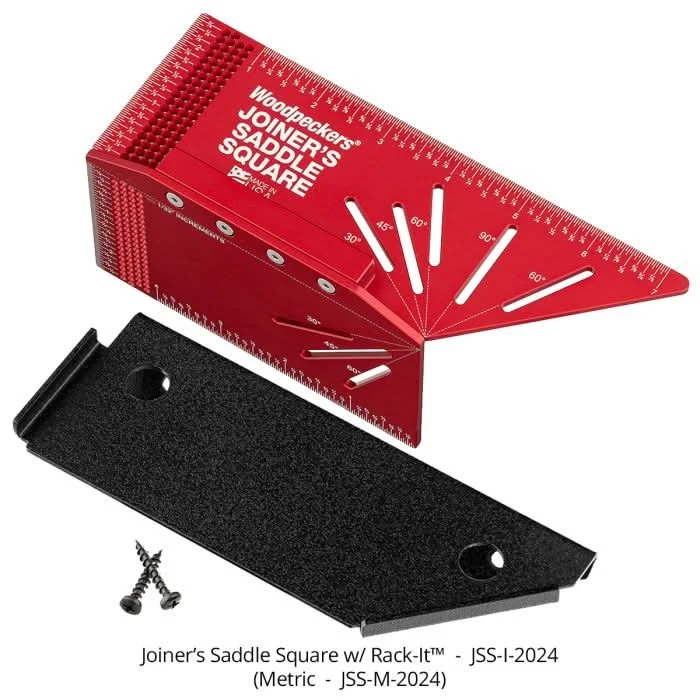
Marks Two Faces The layout lets you mark the face and edge of your stock at the same point, which speeds up setup and helps keep lines aligned when accuracy matters. Common Angle Guides Built-in 30, 45, 60, and 90 degree marking slots give you fast, repeatable layout without hunting for another square or protractor. Joiner’s Saddle Square This Woodpeckers layout tool has laser-engraved scales in 1/32 inch increments on both long edges and the square end, so your marks stay easy to read and easy to repeat.
Overview
The Woodpeckers Joiner’s Saddle Square, model JSS-I-2024, is a precision woodworking layout square built for marking stock quickly and consistently. This is a layout square designed for woodworking and cabinetmaking layout. If you do joinery, casework, shelf work, or general bench layout, the big advantage here is simple: it helps you carry lines accurately across multiple faces of a board without resetting your reference every time.
What makes this tool useful on the bench is how it works around the material instead of just against one edge. The saddle-style body lets you reference the workpiece and mark from the face to the edge at the same point. That matters when you’re laying out joinery or repeating marks on cabinet parts, because it cuts down on setup steps and helps keep your lines square and consistent.
The Woodpeckers Joiner’s Saddle Square also gives you more than just 90 degree layout. The body includes clearly marked slots for 30, 45, 60, and 90 degree lines, so it covers a lot of the common angle work you run into at the bench. For a woodworker, that means one tool can handle square layout, angled marks, and quick reference work on edges and faces without switching back and forth between tools.
Scale readability is a big part of whether a layout tool earns its keep, and this one is set up for that. The scales are laser engraved in 1/32 inch increments on both long edges and on the square end. In plain terms, that gives you fine reference marks where you actually use them, not just on one side of the tool. When you’re working with small offsets, hardware locations, or repeat cuts, those graduations make the square more than just a guide.
The physical design looks aimed at real bench use, not display-case use. The machined aluminum body has a broad bearing surface, the markings are large and easy to spot, and the shape makes it easier to hold against stock while you scribe a line. The textured surfaces also help with grip and control when you’re working one-handed and marking with the other.
For shop organization, the product imagery also shows the Woodpeckers Joiner’s Saddle Square stored on a Rack-It holder, keeping it visible and ready to grab. That is a practical detail for anyone who wants layout tools off the bench but still within reach. Since the image does not confirm that holder is included, it is best treated as a storage option rather than box content.
This layout square makes the most sense for woodworkers who care about repeatability: cabinetmakers, furniture builders, trim carpenters, and serious DIY users setting out clean, square lines on milled stock. If your work depends on accurate marking before the cut, this is the kind of tool that saves time by reducing re-measuring and helps avoid little layout errors that turn into fitting problems later.
Lay Out Face and Edge in One Setup
One of the biggest time savers here is being able to carry a mark across two surfaces without moving to a different reference tool. That helps keep layout clean when you’re working on joinery or repeating parts.
- Saddle-style layout lets the tool register around the stock
- Designed to mark the face and edge at the same point
Use Common Angles Without Extra Setup
The angle slots make this more versatile than a basic square. Instead of measuring and striking common angles manually, you can drop in your pencil and get repeatable lines fast.
- Marked angle guides shown for 30, 45, 60, and 90 degrees
- Useful for joinery layout, cabinet parts, and bench work
Read the Scale Fast
Fine layout only helps if you can trust what you’re reading. The engraved graduations are placed on both long edges and the square end, so you have reference marks where you need them while working in tight spots or against assembled parts.
- Laser-engraved scales graduated in 1/32 inch increments
- Graduations shown on both long edges and the square end
Key Specifications
| Model Number | JSS-I-2024 |
|---|---|
| Tool Type | Joiner’s saddle square |
| Scale Graduations | 1/32 in increments |
| Scale Locations | Both long edges and square end |
| Angle Guides | 30°, 45°, 60°, 90° |
| Made In | USA |
Built For
Woodworking Cabinetmaking Joinery Layout Furniture Building Bench Work Trim and Casework
Pro Tip
When you need a line to stay true from the face onto the edge, register the Joiner’s Saddle Square off the same reference edge every time instead of flipping the tool around. That keeps small layout errors from stacking up across a run of parts.
Tool Nut’s Take
Tool Nut’s Take
Why the Woodpeckers Joiner’s Saddle Square earns bench space
The Woodpeckers Joiner’s Saddle Square is the kind of layout tool that makes sense the first time you need one clean mark to carry across multiple faces without fussing around.
- Who it’s for: Woodworkers, cabinetmakers, and serious DIY users who want faster, more repeatable layout on milled stock.
- Why it stands out: The saddle format, the built-in 30, 45, 60, and 90 degree guides, and the 1/32 inch laser-engraved scales all make it more useful than a basic square.
- Worth knowing: The images show a Rack-It storage holder, but the provided data does not confirm that it is included with the square.
Common Questions
- What is the Woodpeckers Joiner’s Saddle Square used for? It is used for woodworking layout, especially when you want to mark the face and edge of stock from the same reference point.
- What angle layouts does it support? The tool body shows guides for 30, 45, 60, and 90 degree marking.
- How are the scales marked? The scales are laser engraved in 1/32 inch increments on both long edges and the square end.
- Where is it made? The product imagery states that it is made in the USA.
Reviews
There are no reviews yet.